WordPress plugins
Coming soon to WordPress.org
CheckShop for Moneybird
Create Moneybird invoices from WooCommerce orders automatically, with customer sync, payment registration, credit notes and VAT mapping.
Pro from 99 € per year, excl. VAT
What it does
CheckShop for Moneybird connects your WooCommerce store to Moneybird through the official Moneybird API. Orders become sales invoices, customers become contacts, and payments and refunds are recorded without manual work. Data goes directly from your WordPress site to Moneybird: there is no intermediate server.
Requirements: WordPress 6.2 or later, PHP 7.4 or later, WooCommerce, and a Moneybird administration.
Included in the free plugin
Automatic invoicing
A sales invoice is created for every order that reaches one of the order statuses you choose.
Customer sync
Billing details are created or updated as a Moneybird contact.
Payment registration
Paid orders are registered as paid on the invoice, on the financial account you choose.
Credit notes and uncollectible invoices
A refund creates a credit invoice, full or per refunded line. Cancelled or failed orders mark their unpaid invoice as uncollectible.
VAT mapping, workflow and layout
Map each WooCommerce tax rate to a Moneybird tax rate, and choose the Moneybird workflow and invoice layout.
Sync log, retries and manual sync
Statistics and a log of every sync with a timeline per order, retries for failed syncs, a Sync button per order and a bulk action.
All of this is free, with no limit on the number of orders.
Free, Pro and Agency
Pro and Agency are an add-on on top of the free plugin. The free plugin works fully without it.
| Feature | Free0 € | Pro99 €per year | Agency149 €per year |
|---|---|---|---|
| Everything in the free plugin | |||
| No limit on the number of orders | |||
| VAT rate per product category | |||
| Financial account per payment method and ledger account per shipping method | |||
| Product sync by SKU and a ledger account per product | |||
| Invoice PDF and UBL in My Account, PDF attachment in emails, PDF, UBL and packing slip downloads in the admin | |||
| Moneybird webhooks for paid status, contact changes and payments | |||
| WooCommerce Subscriptions as recurring sales invoices | |||
| EU VAT number and Chamber of Commerce fields at checkout (classic checkout), VIES validation and reverse charge | |||
| Custom field mapping and order note sync | |||
| CSV export of the sync log and failure email alerts | |||
| REST API | |||
| WP-CLI commands | |||
| WordPress multisite | |||
| Sites per license | No license needed | 1 site | Unlimited |
| Coming soon to WordPress.org | Buy Pro | Buy Agency |
Prices are per year and exclude VAT.
How it works
Step 1
Install the free plugin
Install CheckShop for Moneybird from WordPress.org next to WooCommerce and activate it.
Step 2
Connect Moneybird
Create an application in Moneybird with the redirect URI the plugin shows, enter the Client ID and Client Secret and click Connect to Moneybird.
Step 3
Choose your accounts
Choose the revenue ledger account, payment account and VAT mapping. New orders now become invoices in Moneybird.
Demo
Screenshots of the plugin in the WordPress admin. The best demo is the free plugin itself: it is the complete sync, not a trial.
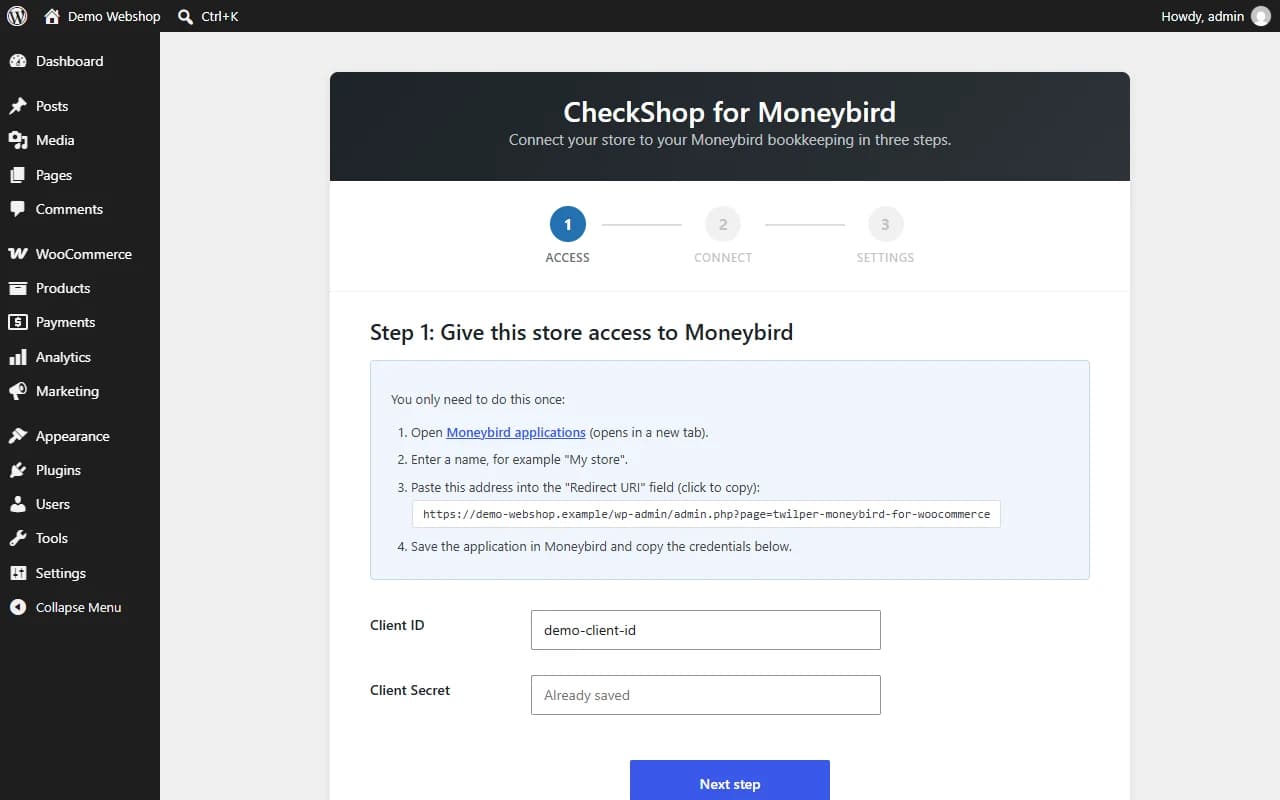
Setup wizard: give the store access to Moneybird in three steps 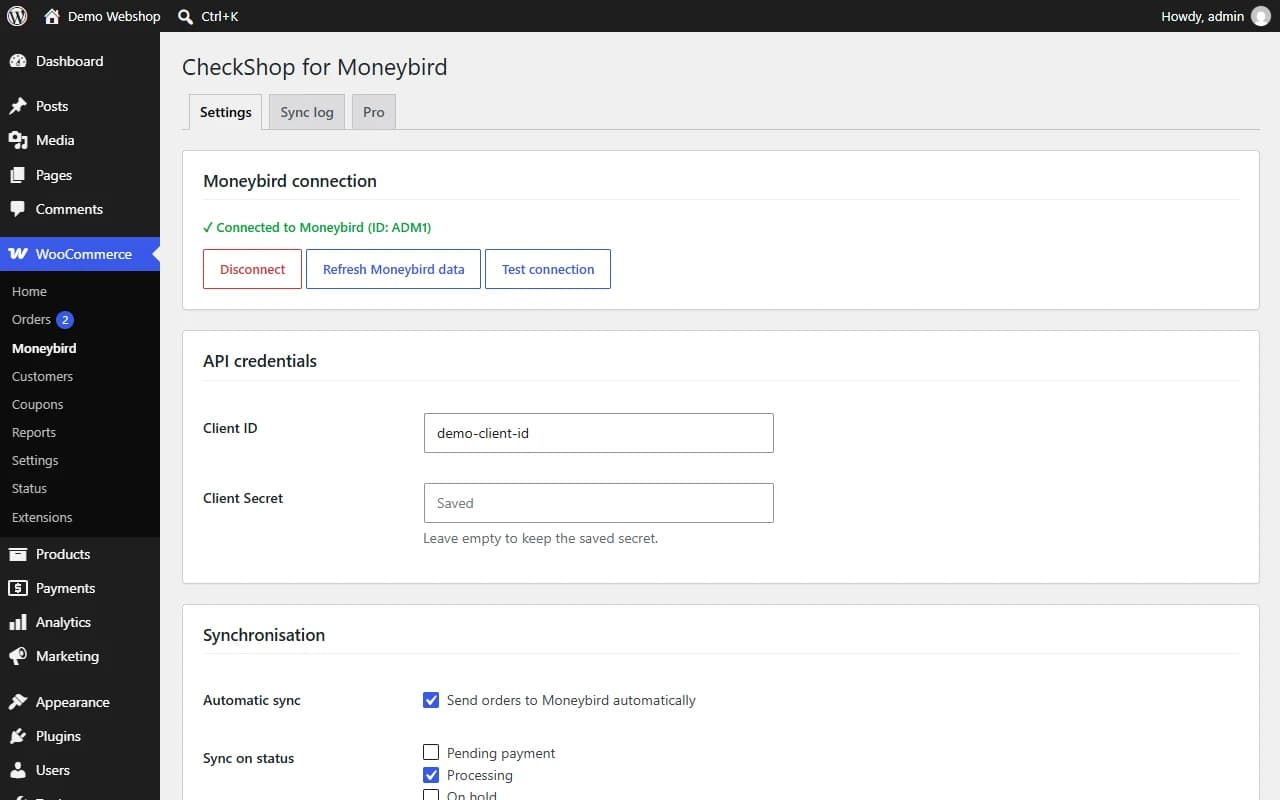
Settings: Moneybird connection, API credentials and synchronisation options 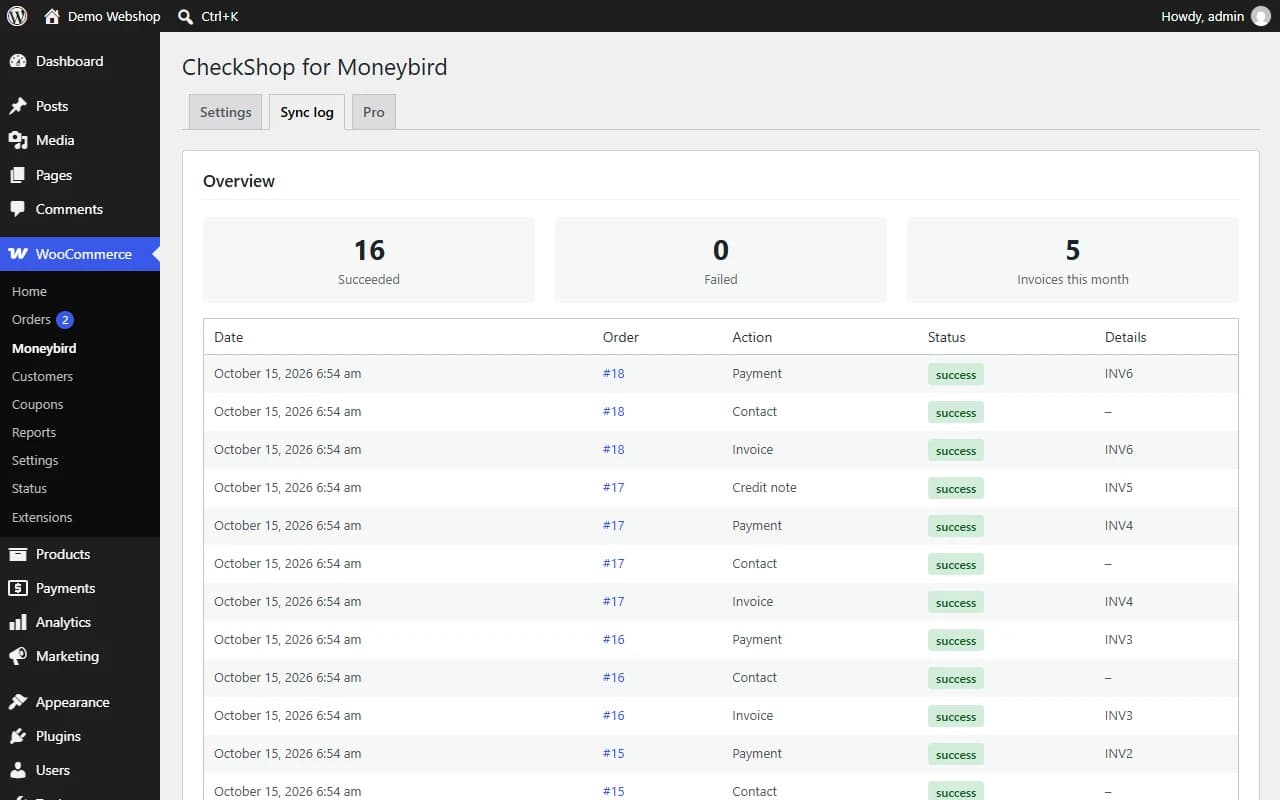
Sync log with statistics 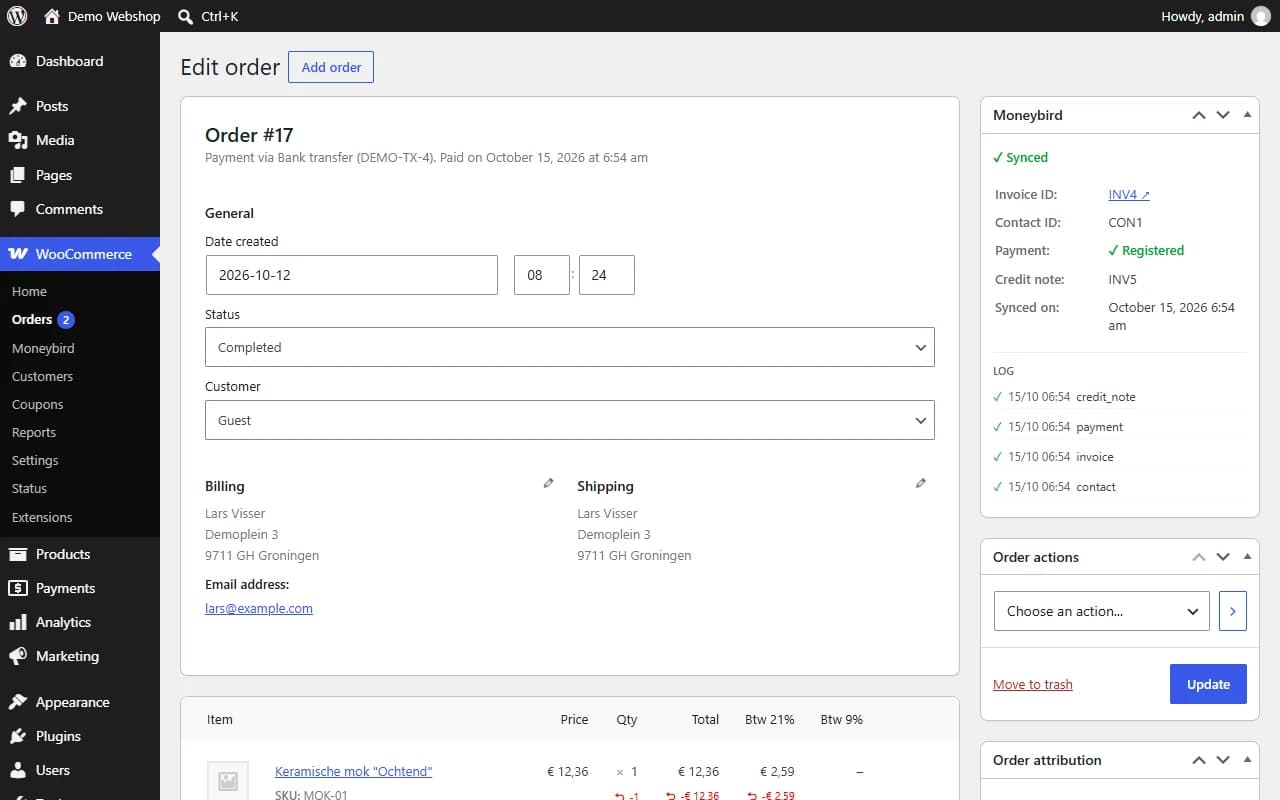
Moneybird box on the order screen with invoice, payment and credit note status 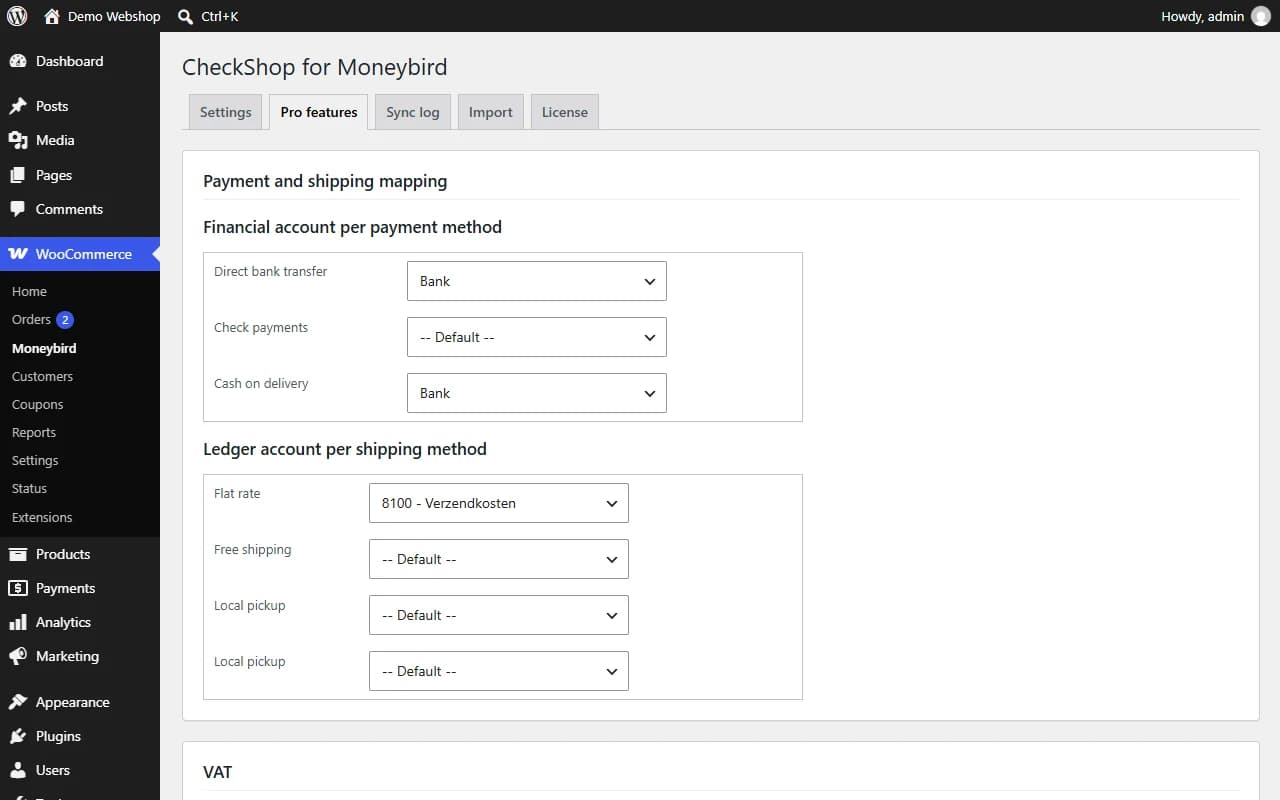
Pro add-on: financial account per payment method and ledger account per shipping method
Frequently asked questions
How do I create a Moneybird application?
Go to moneybird.com/user/applications/new, enter a name and paste the redirect URI shown on the plugin settings page. Moneybird then shows a Client ID and Client Secret for the plugin.
Do I need Pro?
No. The free plugin has no limit on the number of orders and Pro is not needed for any of its features. Pro adds the extras in the table above, such as product sync, PDFs for customers, webhooks and Subscriptions support.
Are existing orders synced?
Not automatically. Only orders that reach a selected status after connecting are synced; the hourly background task also looks back seven days. Older orders can be synced with the Sync button or the bulk action.
What happens on a refund?
A full refund duplicates the invoice as a credit invoice. A partial refund creates a credit invoice with the refunded lines.
Are invoices created as draft?
Yes, unless "Send invoice" is enabled. Registering a payment on a draft invoice finalizes it first, because Moneybird only accepts payments on open invoices.
Where are my Moneybird credentials stored?
In your WordPress database. The client secret and OAuth tokens are encrypted (AES-256-GCM) when the PHP OpenSSL extension is available; without OpenSSL they are only base64-encoded.
Where does my data go?
Straight from your site to the Moneybird API. The Pro add-on additionally talks to the license server at twilper.com (license key, site domain, product and plugin version) and, only when VIES validation is enabled, to the European Commission's VIES service.
Does it work with HPOS?
Yes, and with the WooCommerce Cart and Checkout blocks.
I used Twilper for Moneybird. How do I upgrade?
Deactivate Twilper for Moneybird before activating this plugin. Your settings and the Moneybird connection are kept. The advanced features moved to the Pro add-on; their settings are kept and used again when Pro is installed.
Another question? Contact us
Moneybird is a trademark of its owner. CheckShop is an independent developer and is not affiliated with or endorsed by Moneybird.